
Realistic AI Image Tutorial
THE AI SELFIE SYSTEM
How to Create Ultra-Realistic AI Portraits (No Camera Required)
WHAT YOU'LL CREATE
A realistic, scroll-stopping AI portrait — the kind that makes people ask, "Wait… is that real?"
No photoshoot. No model. No studio. Just AI + the right prompts.
TOOLS YOU'LL NEED
✅ Pinterest — for reference images
✅ Nano Banana Pro — for AI image generation
✅ Google Veo 3.1 (optional) — for animating into video
THE 6-STEP PROCESS
STEP 1: Find Your Reference Image
Go to Pinterest and search for a realistic portrait that matches your desired vibe.
Tips for choosing:
Look for natural lighting (not studio flash)
Avoid heavy filters or edits
Choose images with subtle skin texture and soft shadows
The closer to your vision, the better your result
📌 Save 2–3 options so you can test variations.
STEP 2: Download the Image
Save the reference image to your device. This will be your visual anchor for the AI.
STEP 3: Upload to Nano Banana Pro
Open Nano Banana Pro and upload your reference image.
Use the reference image (or omnireference) feature — this tells the AI to match the style, lighting, and energy of your chosen photo.
STEP 4: Write Your First Prompt
This is where the magic happens.
Your prompt should describe:
Subject (age, gender, expression, vibe)
Lighting (natural, golden hour, soft shadows)
Camera style (portrait lens, shallow depth of field)
Skin texture (realistic, natural imperfections)
Mood (calm, confident, candid)
🔑 PROMPT 1:
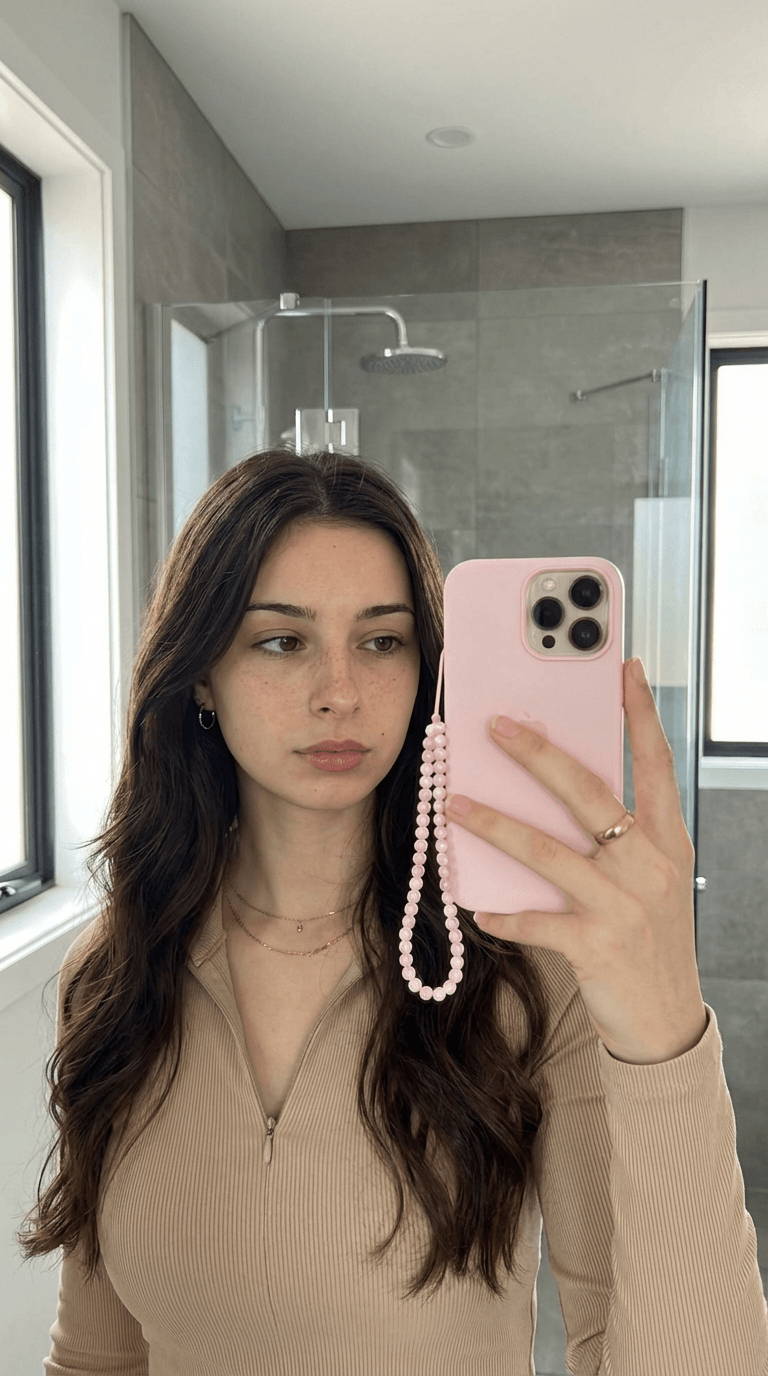
A young woman with long, dark brown, wavy hair is taking a mirror selfie in a modern bathroom. She appears to be in her late teens or early twenties. She has a fair to light olive skin tone with visible freckles or minor blemishes on her face. She is wearing a light tan or beige ribbed top with a zippered collar that is partially unzipped. She is wearing minimal jewelry, including small hoop earrings and a few delicate gold necklaces. Her expression is neutral, and she is looking slightly off-camera toward the phone screen.
She is holding a pink smartphone in her right hand, which is obscuring part of her face. The phone case has a pale pink beaded phone strap attached to it, which hangs down. A gold ring is visible on the ring finger of her right hand.
The background is a modern bathroom with a large mirror and gray tiled walls. Behind her, a glass shower enclosure with a showerhead is visible, suggesting a clean, minimalist design. Natural light is coming in from a window on the left and partially on the right side of the frame. The lighting is bright and soft.
📌 Pro tip: Be specific. Vague prompts = generic results.
STEP 5: Generate + Download
Click generate. Review the result — if it's close but not perfect, tweak your prompt and regenerate.
Once you're happy, download the image.
STEP 6: Create a Close-Up (The Secret Step)
This is what separates good AI portraits from great ones.
Re-upload the image you just created as a new reference.
Now write a second prompt asking for a tighter crop — a close-up shot that adds even more realism.
🔑 PROMPT 2 (Close-Up):
A close-up vertical shot focuses on the face of a young woman, likely in her late teens or early twenties, with a light brown or tan skin tone that is visible around her nose, cheeks, and forehead. She has dark brown eyes and arched, full dark eyebrows. Her dark hair frames the sides of her face but is mostly out of view. Her facial features include a scattering of very subtle freckles, slight imperfections particularly across her cheeks and nose. Her mouth is slightly open, revealing her upper teeth in what appears to be a smile or while speaking. The lighting is bright and even, highlighting the texture of her skin. .
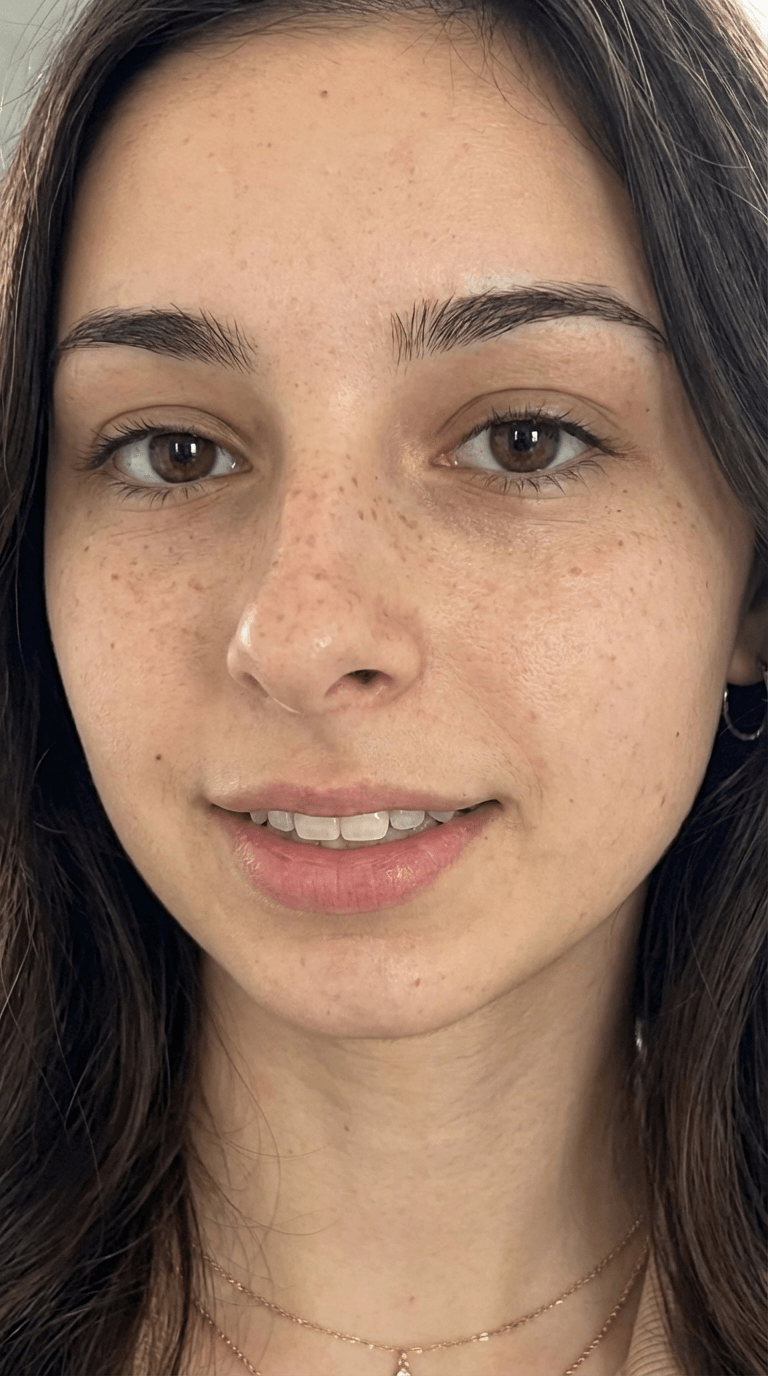
Result: A clean, hyper-realistic close-up portrait ready for content.
OPTIONAL: ANIMATE WITH VEO 3.1
Want to turn your AI portrait into a video?
Upload your final image to Google Veo 3.1 and let it generate:
Subtle facial movement
Natural blinking
Realistic micro-expressions
This is how you create AI humans that move — perfect for Reels, UGC-style ads, or AI influencer content.
WHAT YOU CAN USE THIS FOR
✅ AI influencer content
✅ UGC-style ads (without hiring a creator)
✅ Faceless brand content
✅ Social media posts that stop the scroll
✅ Product mockups with "real" people
✅ Scalable content for digital businesses
READY TO GO DEEPER?
This tutorial gives you the basics — but if you want to master AI content creation and turn it into income…
👉 Check out MPV: AI + Storytelling System
Inside, you'll learn:
How to build consistent AI characters
Storytelling frameworks that convert
Content systems that sell while you rest
The exact workflows I used to hit $100K+ without filming
Follow


Drop your email address below to get our newsletter.
Privacy policy | Terms of use | Cookies